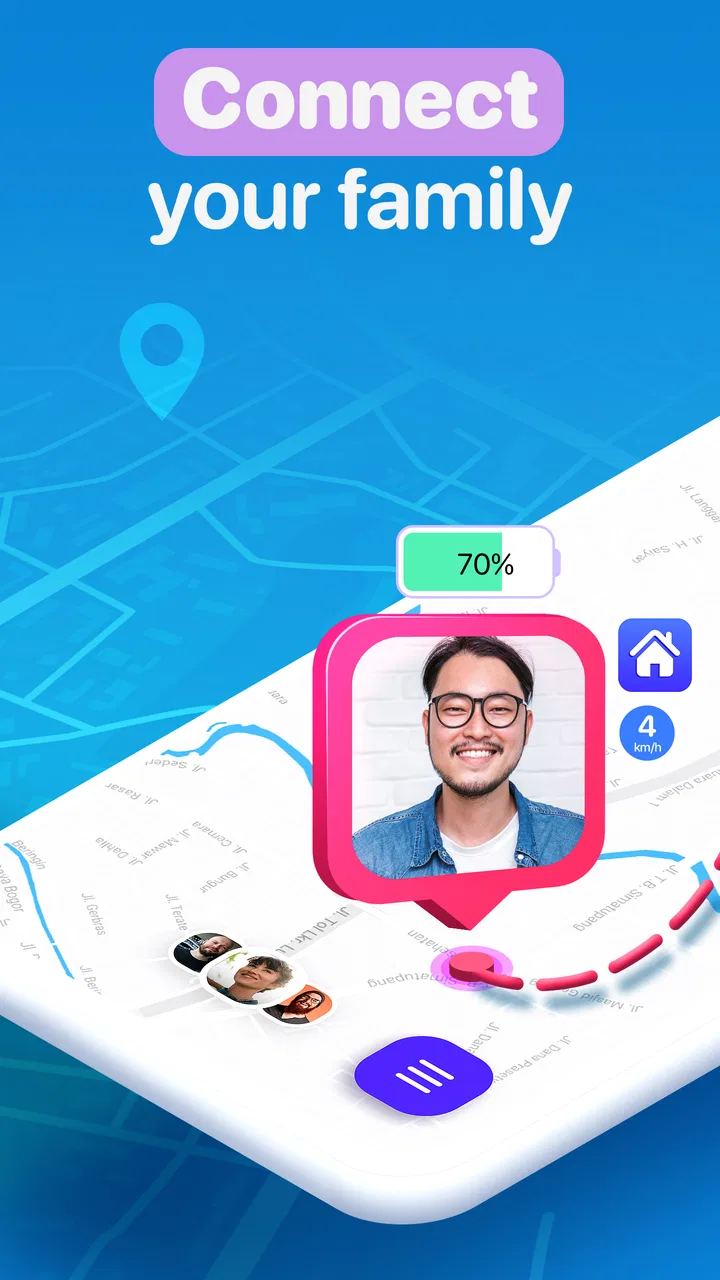
Famio: Connect With Family
- 3.6
- Rating
- 10.00M
- Installs
- Free
- Price

 Analysis by App-foxy
I approached Famio: Connect With Family as a practical family-safety and communication app rather than something to open casually for entertainment. Its purpose is straightforward: help relatives stay connected and feel more secure during ordinary routines. In my experience, that sounds simple, but apps built around family coordination only become useful when everyone involved completes the setup and understands what each person is expected to do.
That is the main theme of my review. Famio can be helpful for people who want a shared way to keep in touch with loved ones, but its value depends heavily on reliable phones, clear invitations, and realistic expectations. It is a free lifestyle app from Gismart, available for Everyone, with optional in-app purchases ranging from $4.99 to $79.99 per item. The current version is 1.43.2 and it requires iOS 11 or later, so checking device compatibility before planning a family rollout is sensible.
Where family users are most likely to get stuck
The first difficulty is rarely the idea behind the app. It is usually the gap between installing it and getting every family member into the same working routine. One person may install Famio immediately, while another delays the invitation, overlooks a confirmation step, or uses a different account than expected. Until the group is properly connected, the experience can feel empty or unreliable even when the app itself is functioning normally.
You May Also Like

 AccuWeather: Weather Radar
AccuWeather Review: A Quick, Clear Forecast for Everyday Decisions
For everyday plans, the best forecast is the one you can understand quickly. AccuWeather makes rain timing, radar, and local conditions easy to act on, with a few trade-offs.

 Hill Climb Racing
Why Hill Climb Racing Still Turns Crashes Into One More Run
A tiny car, a bumpy hill and one more upgrade: Hill Climb Racing keeps resurfacing because its simple chaos makes every near-miss feel personal.

 AliExpress - Shopping App
AliExpress Makes Global Shopping Feel Personal, but Shoppers Bear the Risk
AliExpress turns a global marketplace into a pocket-sized discovery engine. Its reach is useful, its shopping loop compelling, and its trade-offs easy to miss.

 Lords Mobile: Kingdom Wars
Lords Mobile Is a Kingdom-Building Routine, Not a Quick Match
A case-by-case verdict on the building, battles, device demands, and social commitments that make Lords Mobile rewarding for some players and exhausting for others.

 PDF Scanner app - TapScanner
TapScanner Makes Paperwork Easier to Capture, Check, and Share
TapScanner makes scanning with a phone feel less like a rescue operation and more like a dependable step in getting work done. Its capture tools are useful, though not flawless.

 Block Blast!
 Shows How Much a Puzzle Game Can Leave Out
A quiet grid game shows why puzzle players increasingly value instant clarity, repeatable skill and low-pressure play—and where the genre still needs to catch up.
More From Our News Desk
View All News


I would therefore avoid judging it after opening it alone for a few minutes. A family connection tool needs at least one other person to participate before its usefulness becomes clear. If you are testing it, choose a relative who is available at the same time and agree beforehand that both of you will finish the initial process together. That small bit of coordination prevents the common mistake of assuming the app has failed simply because the other person has not completed their side.
Another source of confusion is treating Famio like a normal messaging app. Its appeal is not necessarily replacing every conversation you already have. Instead, it is better understood as a dedicated space for staying aware of family members and maintaining a shared sense of contact. If your household already communicates comfortably through regular calls and messages, the extra value comes from organizing family connection around one purpose rather than scattering it across unrelated apps.
That distinction matters for older relatives or less technical users. They may not need every available option; they need a clear reason to use the app and a simple routine. I found that explaining one specific use case works better than saying, “Install this so we can keep track of everyone.” For example, a family might agree to use it when someone is travelling, commuting home, or checking in after an appointment. A defined habit makes the app easier to understand than a vague promise of safety.
The app has attracted a substantial audience, with over 10 million installs and an average rating of 3.6 from around 115 thousand ratings. I read those figures as a sign of broad interest rather than a guarantee of a perfect experience. Family apps are especially sensitive to differences in phones, connectivity, battery settings, and user expectations, so one household’s smooth experience may not match another’s.
Why a missing update may not mean anything is broken
When a family member’s information appears outdated, the natural reaction is to blame Famio. Before doing that, I would check whether the other person has opened the app recently, has a working connection, and has not restricted its operation through the phone’s own settings. A family app cannot show useful, current information if the participating device is offline, switched off, or prevented from communicating normally.
This is one of the most important practical trade-offs. Famio can create a shared family routine, but it cannot remove the basic dependence on the devices and habits of the people using it. If someone regularly leaves their phone at home, disables connectivity, or ignores the app for long periods, no family-focused interface can make that person consistently reachable.
Setup checks that save time later
I recommend setting up the app when everyone has a few uninterrupted minutes rather than during a stressful moment. Start by deciding who really needs to participate. Adding every relative may sound reassuring, but a smaller group of active users is usually easier to manage than a large circle where several people never respond. The best group is the one that understands why it exists and agrees on how it will be used.
Next, make sure each person is working with the intended account and device. This sounds obvious, yet it is a common reason for confusion in shared apps. A family member may have more than one email address, change phones, or complete an invitation on a device they do not normally carry. If the wrong account is involved, later troubleshooting becomes much harder because the symptoms resemble a missing connection.
I would also check the phone’s basic operating-system requirements before inviting someone who uses an older device. Famio supports iOS 11 or later. That requirement is not demanding for many users, but it can still matter for an elderly relative using an old phone or a spare device. A quick compatibility check is more considerate than asking someone to install an app that their handset cannot properly run.
During setup, read each screen rather than tapping through automatically. Family-oriented apps can involve choices about who is connected and how the service operates on a device. I do not recommend granting access casually simply because the app is intended for relatives. Each person should understand what participation means and be comfortable with the arrangement. Consent and clarity are not obstacles here; they are part of making the system trustworthy.
For children or vulnerable relatives, the conversation should happen before installation. A safety tool works better when the person being included knows its purpose and does not feel secretly monitored. Famio is more suitable for an agreed family arrangement than for turning a phone into an invisible supervision device. If the household cannot agree on boundaries, the app is unlikely to create genuine reassurance.
A simple first-day routine
My preferred setup method is deliberately modest. Have one person install Famio and act as the organizer for the first session. Add only the relatives who are ready to participate, then ask each person to confirm that they can see the shared connection. Do not immediately build complicated habits around it. Spend the first day checking whether everyone understands where to look and when they should open or respond.
That approach reveals a useful distinction between technical and social problems. If one person cannot join at all, investigate the invitation and account details. If everyone can join but nobody remembers to use the app, the issue is not installation. The family needs a clearer routine. I would choose one or two moments in the day for checking in instead of expecting constant attention.
It is also worth agreeing on what counts as an urgent concern. If the family treats every delayed update as an emergency, the app may create anxiety instead of reducing it. A missed check-in could mean a dead battery, poor signal, work, sleep, or simple forgetfulness. Establishing a reasonable response plan keeps Famio in its proper role as a communication aid rather than a substitute for judgement or emergency services.
The free entry point makes trying the app relatively easy, but I would pay attention to the purchase screens before confirming anything. Optional purchases are listed from $4.99 to $79.99 per item, which is a broad range. That does not automatically make the app poor value, but it does mean I would compare the available options with the actual needs of the family. Do not subscribe or buy an upgrade merely because a feature sounds reassuring during setup.
Recovering when the family workflow stops working
When Famio seems stuck, I use a fixed order of checks instead of reinstalling immediately. First, I ask whether the problem affects one person or everyone. If only one family member is missing, I focus on that device, account, connection, and participation. If the whole group is affected, I look for a broader issue such as connectivity or a temporary app problem before changing individual settings.
Second, I ask the affected person to open the app and verify that they are using the same account and family connection as before. This is especially useful after changing phones. A new handset can make a familiar user appear absent if the original setup was not carried over correctly. Keeping notes about who joined and which device they normally use may sound excessive, but it helps a family avoid guesswork.
Third, I check the basics: the phone has a usable internet connection, the app is not frozen, and the operating system is compatible. Closing and reopening the app can clear a temporary display issue, while restarting the device can help when several apps are behaving strangely. I would make one change at a time and then test again, because changing everything at once makes it impossible to know what helped.
If an invitation does not appear, I would resend it only after confirming the recipient’s details. Repeatedly sending invitations to the wrong address or account creates more confusion rather than solving the original problem. Ask the recipient to check the exact account they are using, then complete the process while both of you are available. This is a small but genuinely useful recovery habit.
Reinstallation should be a later step, not the first one. Removing an app can interrupt the family workflow and may require people to repeat setup. Before doing it, make sure everyone knows how they will reconnect and that the relevant account information is available. If the issue affects only one device, try less disruptive checks first. Reinstalling may help a corrupted local installation, but it cannot fix an incorrect account or a family member who has not accepted the connection.
How to test whether recovery worked
After making a change, test a normal family action rather than relying on the app opening successfully. Ask the affected person to perform the task that previously failed, then have another participant check the result. This two-person test is more meaningful than staring at a loading screen. It also confirms that the problem is resolved for the people who actually depend on the connection.
I would keep the test simple and repeat it later under ordinary conditions. A system that works only when everyone is sitting together on the same network may not be reliable in daily life. Try again when one person is away from home or using mobile connectivity, while remembering that signal quality and phone settings can influence the result. The goal is not to stress the app unnecessarily; it is to understand what the household can realistically expect.
Families should also agree on a backup method. Regular calls or text messages remain useful when a phone is offline or the app is unavailable. This is not a criticism unique to Famio; it is a sensible rule for any digital safety arrangement. The app can support communication, but it should not be the only path for urgent contact.
When the app is not the cause
Some apparent failures begin outside Famio. A phone with a weak connection, an exhausted battery, aggressive background restrictions, or an outdated system can prevent a family app from behaving consistently. I would check whether other internet-dependent services are also struggling. If several apps fail at the same time, focusing only on Famio will probably waste time.
Location and connectivity expectations also need to be realistic. A phone inside a building, underground, in a rural area, or switched to a restrictive power mode may not communicate in the same way as it does at home. Even if the app is installed correctly, conditions around the device can affect what other family members see. That is why I prefer describing Famio as one part of a family safety routine, not as an infallible live guarantee.
Privacy concerns can likewise be mistaken for technical problems. A relative may hesitate to join, limit participation, or stop using the app because the arrangement feels too intrusive. The right response is a conversation about boundaries, not pressure. Decide who should be connected, what information is appropriate for the group, and when the app should be used. If those questions cannot be answered comfortably, a normal messaging app or occasional phone call may be a better fit.
There is also a difference between reassurance and constant monitoring. Famio may suit parents coordinating with older children, adult relatives checking in with one another, or households that want a shared family-focused channel. It is less suitable for someone who expects perfect real-time certainty about another person’s safety. No app can replace direct communication, personal responsibility, or emergency support.
Compared with ordinary messaging apps, Famio’s advantage is concentration: family connection is the central purpose, so the experience can feel more focused than a busy chat history. Compared with a simple phone call, it may offer a more persistent shared routine, but it also asks more from users because everyone must install, join, and keep participating. Compared with a dedicated emergency service, it should not be treated as a replacement for professional help. Choosing between these options depends on whether your priority is conversation, routine coordination, or urgent assistance.
Who should use it, and who should skip it
I would recommend trying Famio if your family members use compatible phones, are willing to participate openly, and want one place devoted to staying connected. It can be particularly useful when relatives live apart, when schedules make regular calls difficult, or when a household wants a gentle check-in habit without mixing family matters into work and social chats.
I would skip it if nobody in the family wants another app, if the intended users rarely carry their phones, or if the main expectation is guaranteed emergency protection. It is also a poor match for families that cannot agree on privacy boundaries. Installing a safety-oriented app without shared trust can produce more arguments than reassurance.
The app is free to install, but the in-app purchase range makes it sensible to examine the cost before committing to anything beyond the basic experience. I would begin with the no-cost option, involve the people who will actually use it, and only consider a purchase after the family has established a reliable routine. That order protects you from paying for a solution to a participation problem.
My practical verdict after using it as a family tool
Famio is a focused lifestyle app with a clear everyday purpose, and I can see why it has reached over 10 million installs. Its strongest quality is not that it magically solves family safety; it is that it encourages relatives to create a shared communication habit around the people who matter most. When setup is done together and expectations are sensible, that focus can be more useful than another general-purpose chat thread.
My reservations are equally practical. The app depends on every participant using the right account, carrying a functioning phone, maintaining connectivity, and understanding the agreed routine. Those dependencies are easy to overlook when an app is presented as a simple way to keep loved ones safe. I would also treat the optional purchases carefully and avoid assuming that paying will fix an unreliable family workflow.
Gismart’s app is therefore best for cooperative families, not for silent monitoring or emergency certainty. I would give it a fair trial with a small group, complete the setup side by side, test the connection under normal conditions, and keep calls or messages available as a backup. If the family wants a dedicated space for staying in touch and can commit to using it, Famio is worth considering. If the household already communicates smoothly elsewhere or resists shared tracking and check-ins, the usual alternatives may be simpler and more comfortable.
My bottom line is simple: Famio can support family safety, but the family routine is the real product. The app works best when it reinforces honest communication rather than trying to replace it. Used with that understanding, it is a reasonable free starting point for relatives who want to stay connected; used as a promise of constant certainty, it is likely to disappoint.
FAQs for Famio: Connect With Family
01What is Famio: Connect With Family used for?
Famio is a family-focused communication and location-sharing app designed to help relatives stay connected. Depending on the features available in your region and subscription plan, you can use it to view family members’ locations, exchange messages, share places, receive location-related alerts, and coordinate everyday activities. It is especially useful for families who want a single private space for communication and basic safety check-ins.
02Does Famio require access to my location and other personal information?
Yes. Location-based features generally require permission to access your device’s location, sometimes even when the app is running in the background. Famio may also request access to notifications, contacts, camera, or photos for communication and profile features. Before accepting permissions, review the app’s privacy policy and your phone settings. You can usually deny optional permissions, although some tracking or alert features may not work correctly.
03Can I use Famio to track family members without their knowledge?
No. Responsible use of Famio requires the consent and participation of the people included in your family group. Location sharing should be enabled openly, and members may be able to pause or change their sharing settings depending on the app configuration. Secret tracking can violate privacy, damage trust, and may be illegal. Parents should also review local laws and use child-safety features appropriately rather than treating the app as a substitute for communication.
04Is Famio free, or does it require a subscription?
Famio may offer a free download with basic functions, while advanced tools can be restricted to a premium subscription or trial. Paid features may include expanded location history, additional alerts, larger family groups, or enhanced safety options. Pricing, trial length, renewal terms, and available features can vary by platform and country. Check the Google Play or App Store listing before subscribing, and cancel through your store account if you no longer want automatic renewal.
05Will Famio work reliably in every location?
Famio’s performance depends on GPS availability, mobile data or Wi-Fi, battery settings, and the permissions granted on each family member’s device. Indoor locations, weak signals, disabled background activity, low-power modes, or restricted app permissions can cause delayed or inaccurate updates. For the best results, keep location services enabled, allow necessary background access, and maintain an internet connection. The app should support communication, but it should not replace emergency services or direct contact.
Pros
- Real-time location sharing helps families coordinate safely.
- Private family groups keep shared updates limited to trusted members.
- SOS alerts can quickly notify selected contacts during emergencies.
- Location history may help review recent trips and daily routines.
- Simple interface is accessible for less tech-savvy relatives.
Cons
- Continuous GPS use can noticeably reduce battery life.
- Some safety features may require a paid subscription.
- Location accuracy can vary indoors or in dense urban areas.
- Family members must agree to share data for full functionality.
- Background location access raises privacy concerns for some users.

Famio: Connect With Family
Gallery